Start with the correct pool and token context
Choose the chain, protocol, token identities and pool before preparing the action. A similar token symbol is not enough to identify the intended asset.
Prepare token and pool operations through AI-assisted workflows with explicit assets, amounts, permissions, slippage limits and local approval.
A separate transfer scene: source, asset, destination, fees and permissions.
Keep the selected wallet and token identity attached to the transfer.
Plan generation is not a signature. Provider acceptance is not confirmation. Review the actual result before retrying.
Inspect the token pair, pool, network, permissions and final operation together.
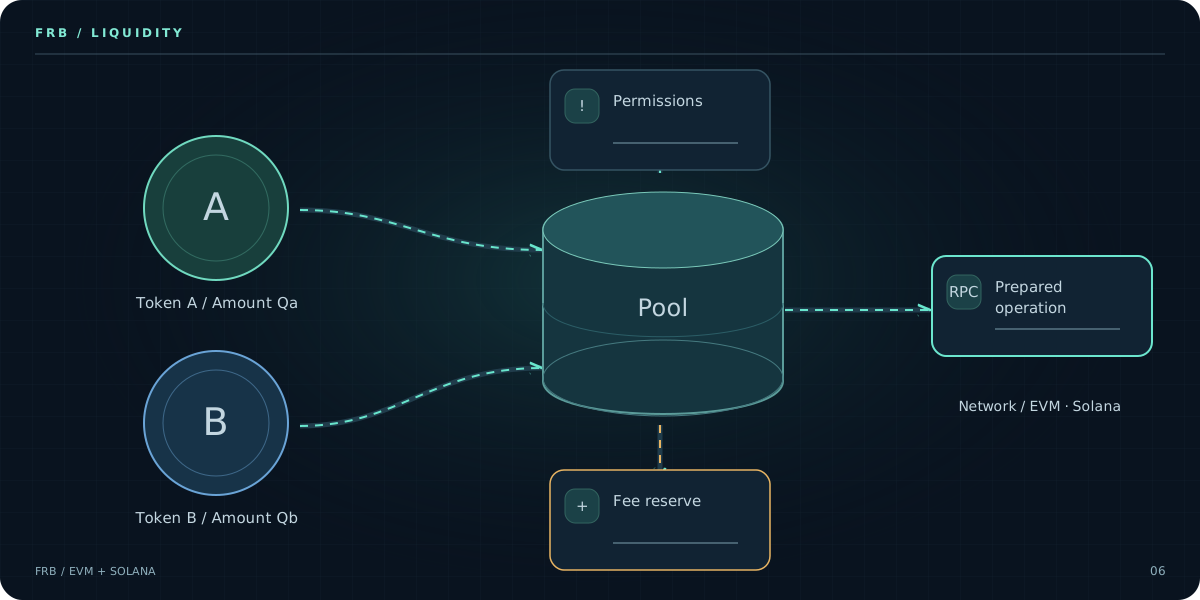
Static overview. Open the walkthrough to explore each stage.
Identify the network, pool and intended liquidity operation before preparing it.
Check both assets and their intended amounts. These diagrams show no prices, balances or returns.
Keep token permissions visible and distinguish them from the liquidity operation itself.
Inspect the selected provider and fee settings, and retain the required fee reserve.
Review the pool, assets and constraints together before approving local signing.
Submission is not finality. Check the actual result and changed assumptions before repeating an operation.
Choose the chain, protocol, token identities and pool before preparing the action. A similar token symbol is not enough to identify the intended asset.
Inspect balances, allowances, proposed amounts, slippage and network fees. Keep token transfers and liquidity actions distinct in the plan.
Use preflight to inspect the proposed workflow and approve local signing separately. Review on-chain outcomes; submission alone does not prove a position changed.
Give the agent a specific goal and the wallet and network context it needs. Resolve missing inputs before moving on.
Keep amounts, destinations, permissions and execution limits explicit. Review the proposed actions instead of granting an open-ended mandate.
Inspect preparation and simulation separately from approval, local signing and submission. Check each returned outcome.
Review chain ID, wallet permissions, nonce, gas and the configured RPC or private-submission provider. Flashbots routes depend on chain and provider support.
Review accounts, token programs, blockhash validity, fees and the selected RPC or Jito route. Bundle acceptance, inclusion and confirmation are different states.
Local transaction signing and AI inference are different boundaries. Review the AI provider and what context it receives. Keep private keys, seed phrases and provider credentials out of chat. Protect your Windows device and verify every operation before approval.
Control stays visible.FRB is a non-custodial execution workspace for your wallets. It organizes network context, operations and approvals while transaction signing stays on your Windows device. You control the wallets and provider connections; FRB is not a hosted account holding your balance.
FRB connects AI chat to structured trading workflows: wallet and network context, a reviewable operation plan, approval and local execution. A chat response alone is not an executed trade.
No. Define the task and its boundaries, review the proposed actions and retain approval over signing. Do not treat an agent as an unrestricted mandate.
Local signing does not imply local AI inference. Review your chosen AI provider and the context sent to it. Never put private keys or seed phrases into a prompt.
No. Market prices, liquidity, fees, ordering and provider conditions still affect the outcome. Simulation, AI output and submission acceptance do not guarantee execution or returns.
FRB Agent runs on Windows. You can read these guides on mobile and copy the download link for your Windows computer. Use the matching EVM or Solana dashboard to connect the installed agent.